

Contents
WagerLand login is done through the Log in button in the top-right corner of the WagerLand casino site, next to the Join button. It opens a Log In page with two fields - Email and Password - and a Log in button; the eye icon in the password field shows the password to check for typos. The same page works in desktop and mobile browsers without an app. If the login fails, the Forgot Password link under the form sends a reset, and live chat support in the bottom-right corner helps with locked or unactivated accounts.
Signing in gives access to the GBP balance, the Deposit section, the Rewards Centre with Perks, Progressive Cashback and the Wheel of Luck, and the full game lobby. By logging in, players agree to the casino's Terms & Conditions, which are linked directly under the form.
| Login essentials | Details |
|---|---|
| Where to log in | Log in button, top-right corner of the header |
| Login method | Email + password |
| Password visibility | Eye icon inside the password field |
| Password reset | Forgot Password link under the form |
| No account yet | Join Here link under the form |
| Device support | Desktop and mobile browsers, iOS and Android |
| Activation | Account must complete the Activation step of registration |
| When verification appears | Before the first withdrawal |
| Currency | GBP (£) |
| Support | Live chat button, bottom-right corner |
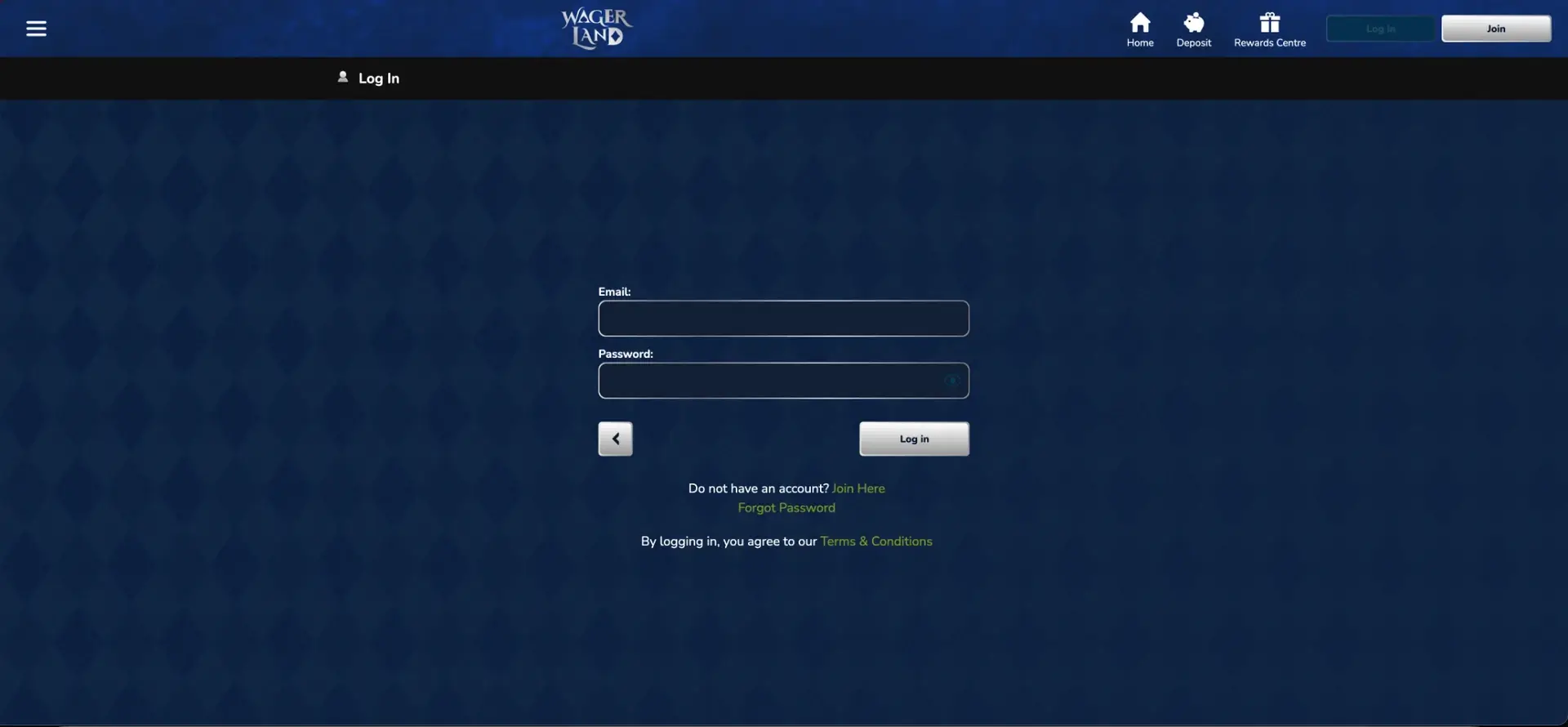
How to log in to WagerLand
The Log in button stays in the header on every page - homepage, lobby, Rewards Centre or game pages - so signing in is possible from anywhere on the site.
Step-by-step WagerLand login
The whole process takes less than a minute.
- Open the official WagerLand casino site.
- Click Log in in the top-right corner, next to Join.
- Enter the email address used during registration in the Email field.
- Type the password in the Password field; tap the eye icon to check it if needed.
- Click the Log in button under the form.
- The header switches to the account view with the GBP balance and access to Deposit and Rewards Centre.
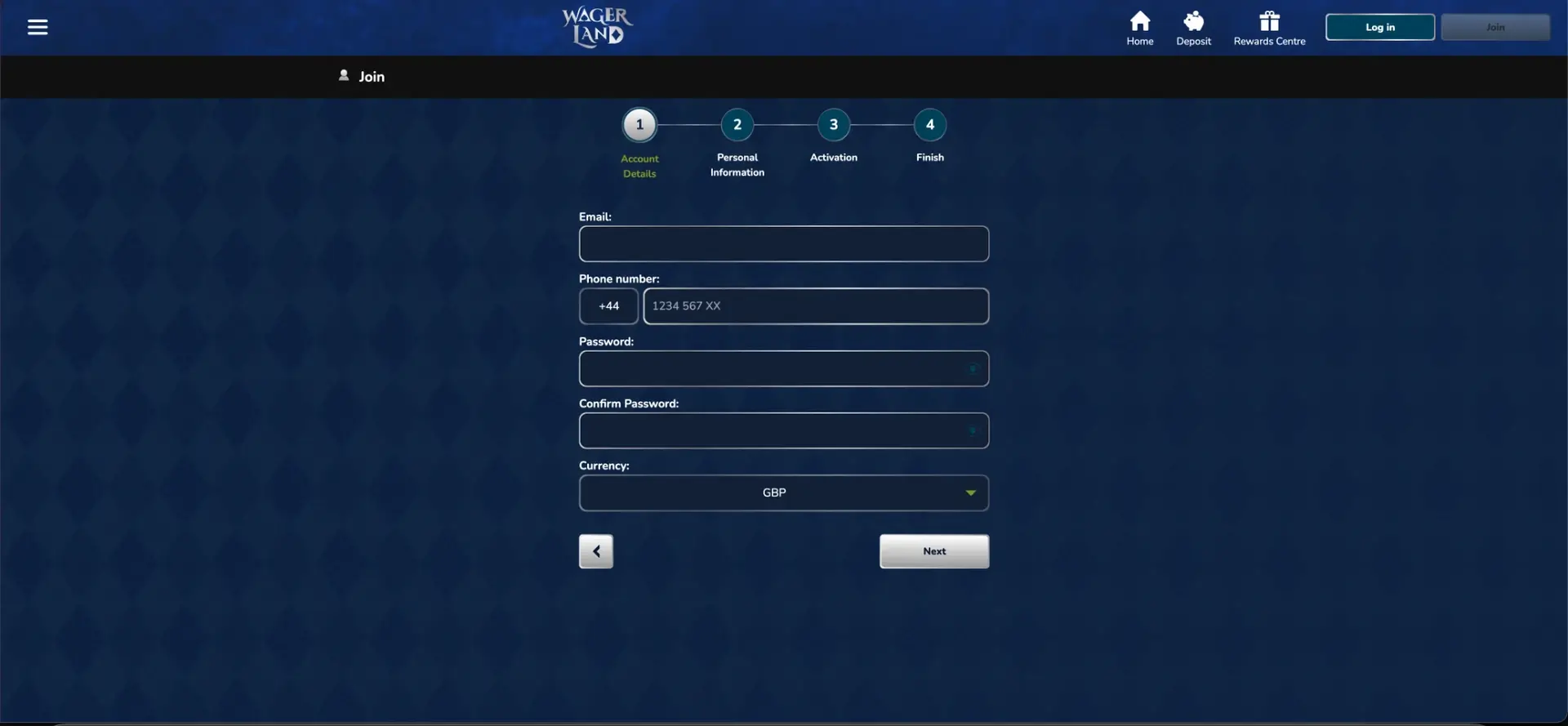
No WagerLand account? Join first
The login form only works for registered and activated accounts. New players click Join Here under the form or the Join button in the header.
Quick registration flow
Registration starts with a bonus choice and then runs through four numbered steps.
- Choose a welcome offer: Premium Bonus (200% up to £1,500 + 100 FS on Lucky Angler + 1 Wheel of Luck spin), Progressive Cashback (up to 20%) or Continue Without Bonus.
- Account Details: email, phone number with +44, password, password confirmation and GBP currency.
- Personal Information: name, date of birth and address.
- Activation: confirm the account via the code or link sent.
- Finish: the account is ready, and the same email and password are used to log in from then on.
Secure WagerLand login practices
Account security depends mostly on the player's own habits. A few rules keep a WagerLand account and its balance safe.
- Use a unique password for WagerLand that is not used anywhere else.
- Use the eye icon only when nobody else can see the screen.
- Sign out after playing on shared or public devices.
- Check the address bar shows the official WagerLand domain before entering details.
- Keep the registered email secure, since password resets are sent there.
- Never share login details, even with someone claiming to be from support.
WagerLand password recovery
A forgotten password is reset through the Forgot Password link directly under the login form. The reset message goes to the registered email address.
Password reset steps
The reset replaces the old password, so the new one should be stored safely straight away.
- Click Log in, then Forgot Password under the form.
- Enter the email address registered to the WagerLand account.
- Open the reset email - check spam and promotions folders if it does not appear.
- Follow the link and set a new password.
- Return to the Log In page and sign in with the new password.
WagerLand mobile login
WagerLand uses the same header layout on mobile as on desktop, with the menu icon on the left and the Log in and Join buttons on the right, so the login process is identical. The form fields are large enough for touch input, and the eye icon helps avoid typos on small keyboards. The account, balance, bonuses and Perks progress are shared across all devices.
Tips for logging in on mobile
A couple of settings make mobile access faster.
- Add WagerLand to the home screen: Safari → Share → Add to Home Screen, or Chrome → menu → Add to Home screen.
- Turn off auto-capitalisation if the email field adds a capital letter.
- Let the browser save the password only on a personal phone with a screen lock.
- Switch between Wi-Fi and mobile data if the page keeps loading.
Troubleshooting common WagerLand login errors
Most WagerLand login problems have one of a few causes. Working through them in order solves nearly all cases without contacting support.
Incorrect email or password
Check that the email is exactly the one used at registration and use the eye icon to verify the password. Passwords are case-sensitive, so Caps Lock and keyboard language matter. After two or three failed attempts, use Forgot Password rather than guessing further.
Account not activated
Registration includes an Activation step. If it was skipped or the code expired, the account may not allow login or deposits. Live chat support can resend activation or confirm the account status.
Browser or cache issues
If the Log in button does not respond or the page reloads without signing in, stored browser data or an extension is usually the cause.
- Clear cookies and cache for the WagerLand site.
- Disable ad blockers and script blockers for the site.
- Try a private window or another browser such as Chrome, Safari or Firefox.
- Update the browser to the latest version.
Account restricted or self-excluded
Accounts can be restricted after repeated failed logins, during a verification check, or when a cooling-off period or self-exclusion is active. In these cases correct credentials still fail. Support explains the reason and the steps to restore access where possible.
What you access after WagerLand login
Once signed in, the full account is available from the header and the menu icon.
- Deposit: the GBP cashier for deposits and withdrawals.
- Rewards Centre: Progressive Cashback, Perks, Wheel of Luck and the VIP Club.
- Perks profile: current level, tier (Ace, Spinner, Legend or Pro) and next reward.
- Wheel of Luck: the spin counter and the wheel itself.
- Jackpot and events: the four-level jackpot and seasonal campaigns such as Monster Mash.
- Game lobby: Top 20, Queen's Exclusives, VIP Selection, Casino Floor and live casino.
- Account settings: personal details, verification documents and responsible gambling limits.
WagerLand account verification (KYC)
Verification is separate from login but affects what the account can do. Before the first withdrawal, WagerLand asks for photo ID, proof of address from the last three months and proof of the payment method. The details must match the information entered in the Personal Information step of registration. Further checks can be requested at any time, and access to withdrawals may be paused until they are complete. Uploading documents soon after the first deposit avoids delays later.
WagerLand login FAQ
Short answers to the most common sign-in questions from UK players.
Where is the WagerLand login button?
In the top-right corner of the header, next to the Join button.
What do I need to log in to WagerLand?
The email address and password used at registration.
How do I reset my WagerLand password?
Click Forgot Password under the login form, enter the registered email and follow the reset link.
Why can't I log in to WagerLand?
Common causes are a wrong email or password, an account that has not completed activation, browser cache problems or an account restriction.
Can I log in to WagerLand on my phone?
Yes. The same Log in button and form work in mobile browsers on iOS and Android.
Do I need to verify my account to log in?
No. Login only needs an activated account; documents are required before the first withdrawal.
Is there a WagerLand app for logging in?
No download is needed. The site can be added to the home screen for app-like access.